cat ./work/zero-static-credentials-cicd.mdx
Zero static credentials: OIDC-federated deployments from GitHub Actions
A deep dive into OIDC federation — why short-lived tokens replaced static keys, and how I wired it into this site's deploy pipeline.
This is the companion to how I built this platform. There I mentioned, almost in passing, that deployments use "zero static credentials." This post is the deep dive into what that actually means, why the whole industry is moving this way, and how the deploy pipeline behind this site is a small, working adoption of it.
Context
For years, the default way a CI/CD pipeline talked to AWS was a long-lived access key pair stored as a repository secret. It works on day one — and then it sits there. It never rotates. It can leak into a build log or a forked PR. And it almost always grants far more than the pipeline actually needs, because nobody wants to debug a permissions error at 2am, so the key ends up broad.
Static keys are, fundamentally, a stored password. And the entire direction of modern identity is away from stored passwords.
Problem
Deploy this site from GitHub Actions to AWS with no static credentials anywhere — nothing on my laptop, nothing in GitHub secrets — and with the blast radius limited to exactly what a single deployment needs.
Why short-lived credentials won — a security view
The reason OIDC (OpenID Connect) spread so fast across cloud, mobile and enterprise systems is that it solves one core problem: verifying who is calling, across distributed systems, without anyone having to store and manage raw passwords. Most of these advantages come from the human sign-in world; the last one — short-lived tokens — is the one that carries straight over to machine-to-machine CI/CD, which is this site's case:
- No stored passwords. Applications don't hold user credentials. Identity verification is delegated to a dedicated identity provider — Google, Microsoft, Okta — so the liability of keeping a credential database off your own plate entirely.
- Centralised MFA, for free. Because authentication happens at the identity provider, an organisation can enforce MFA and passwordless methods like FIDO2/passkeys in one place. Every connected app inherits that protection without each developer hand-coding an MFA flow.
- API-native by design. Legacy SAML leans on heavy XML and browser redirects — clumsy for SPAs, mobile and machine-to-machine calls. OIDC is built on OAuth 2.0 and carries compact, easily parsed JSON Web Tokens, which slot naturally into APIs, microservices and CI runners.
- Single sign-on across everything. One login at the authorization server unlocks many separate applications. Beyond reducing password fatigue, the SSO entry point is a natural place to attach RBAC — roles and permissions are managed centrally rather than re-implemented per app.
- Granular consent via claims. Instead of handing an app a full account, OIDC shares specific claims (email, name, and so on). The user controls what's disclosed — which maps cleanly onto privacy regimes like GDPR.
- Short-lived tokens. Rather than a credential that lives forever, OIDC issues cryptographically signed tokens that expire in minutes. Because they are short-lived by design, a leaked token is a problem for a few minutes, not for the years a static key sits unrotated. (Stateless tokens are hard to revoke mid-flight — the short lifetime is the mitigation.)
That last point is the whole game for CI/CD.
SAML vs OIDC, and why modern stacks reach for JWTs
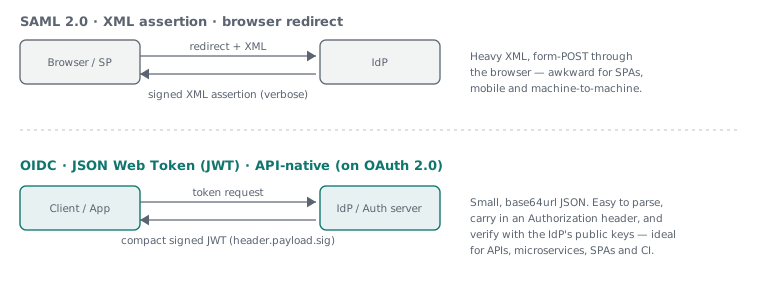
A JWT is just three base64url segments — header.payload.signature. The
payload is plain JSON claims; the signature is verified against the identity
provider's public keys, so the receiver can trust the token without calling
back to the issuer. That self-contained, stateless verification is exactly why
APIs, microservices and CI systems adopted it over SAML's heavier round trips.
Design decisions
I model the pipeline as three IAM roles, each trusting GitHub's OIDC provider, each scoped to what its job needs:
- a read-only plan role for pull requests,
- a least-privilege deploy role — S3 sync plus CloudFront invalidation, and nothing else,
- an environment-gated apply role for Terraform changes.
No role has a stored secret. Each is assumed on demand, used for one job, and gone when the job ends.
Implementation
The handshake
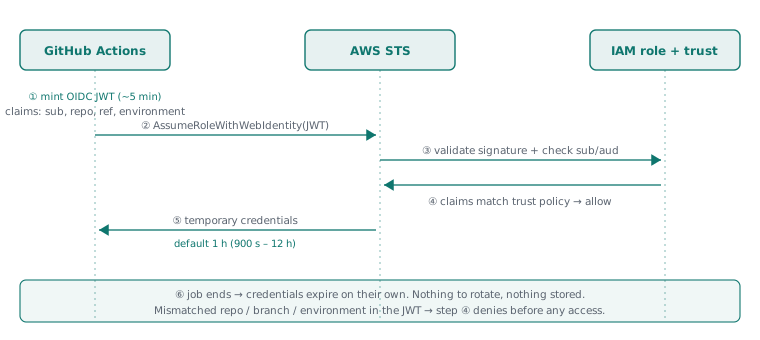
When a workflow runs, GitHub mints a short-lived OIDC token (valid only a few
minutes) carrying claims about the run — the repository, the branch or
environment, the workflow. The aws-actions/configure-aws-credentials action
hands that token to AWS STS via AssumeRoleWithWebIdentity. STS verifies the
signature against GitHub's public keys, then checks the token's claims against
the role's trust policy. Only on a match does it return temporary
credentials.
The trust policy is the security boundary
This is where "you have a token" stops being enough. My deploy role originally
pinned the sub claim to the main branch:
# original: branch-scoped
values = ["repo:${var.github_repository}:ref:refs/heads/main"]
But once I moved my deployment variables into a GitHub Environment called
production, I tightened the trust policy to match the environment claim
instead:
condition {
  test     = "StringEquals"
  variable = "token.actions.githubusercontent.com:sub"
  values   = ["repo:${var.github_repository}:environment:production"]
}
The effect is strict: a workflow can hold a perfectly valid GitHub OIDC token,
but if it's running outside the production environment — wrong branch, wrong
environment, a fork, another repo entirely — the sub claim won't match and
STS refuses before any AWS access is granted. A valid token is necessary but
not sufficient; the context has to match too. This is the claims model from
earlier, applied to deployment: the token only unlocks what its claims are
allowed to.
Pairing this with a GitHub Environment also gives me protection rules — required reviewers, branch restrictions — so production deploys pass through an approval gate before the role can even be assumed.
Where repository configuration fits in
The non-secret deployment values — the role ARN to assume, the bucket name, the
distribution ID — live as GitHub variables, not secrets (they aren't
sensitive, and storing them as plain configuration keeps the workflow
readable). Two properties of this matter for security. First, GitHub never
exposes repository variables or secrets to workflows triggered by a pull
request from a fork — so an outside contributor opening a PR can't exfiltrate
them. Second, by scoping the deployment values to the production environment
rather than the repository at large, the same approval gate that guards the
role also guards the configuration: a collaborator can open a PR and run CI
freely, but the values that actually reach production are released only once a
required reviewer approves the environment. Collaboration stays open;
production stays gated.
One thing worth flagging if you set this up in 2026: for repositories created from mid-June 2026 onward, GitHub's
subclaim now embeds immutable numeric owner and repository IDs to defend against name-reuse attacks, so the claim format is changing. Match your trust policy to the format your repo actually uses.
Token expiration and rotation, concretely
Because people ask how to "rotate" these — you mostly don't, and that's the point. The lifecycle has two separate clocks:
- The OIDC token GitHub mints is valid for only about five minutes — just long enough to exchange it for AWS credentials.
- The AWS session credentials STS returns default to one hour, and can
be set anywhere from 15 minutes to 12 hours via
role-duration-seconds(bounded by the role'sMaxSessionDuration).
My deploys take a couple of minutes, so I keep the session short — there's no reason to hold an hour-long credential for a two-minute job. There's no rotation cycle to manage because there's no stored secret to rotate: every run gets a fresh credential that expires on its own. (One gotcha if you ever chain roles across accounts: chained sessions are capped at one hour regardless of the role's max — fine for a short Terraform apply, something to design around for a long migration.)
Lessons learned
The OIDC setup cost one evening. Eliminating credential rotation pays that back permanently — there is simply no key to leak, expire, or forget to rotate.
The honest open item: my Terraform apply role is still broader than I'd like. The deploy role is tight (two actions), but apply needs to touch IAM, CloudFront, S3 and Route 53, so it currently leans on a wide managed policy gated by the environment approval. Narrowing that to a hand-scoped policy is on the list — a good reminder that "zero static credentials" removes one whole class of risk, but least-privilege is still its own, ongoing discipline.